
Sales Codes
Sales codes are how sales are recorded.
Every accounting system has them.
FreeDAM does and so does Xero.
When we push invoices to Xero our sales codes get translated to Xero’s Sales codes through a ‘Map’,
and everything just works.
If an items get coded to the wrong sales code then the owner and the accountants get the wrong information and may make incorrect assumptions and decisions.
This is why it is important to understand these.
An Example
These are the sales codes and values for two invoices (fake data).
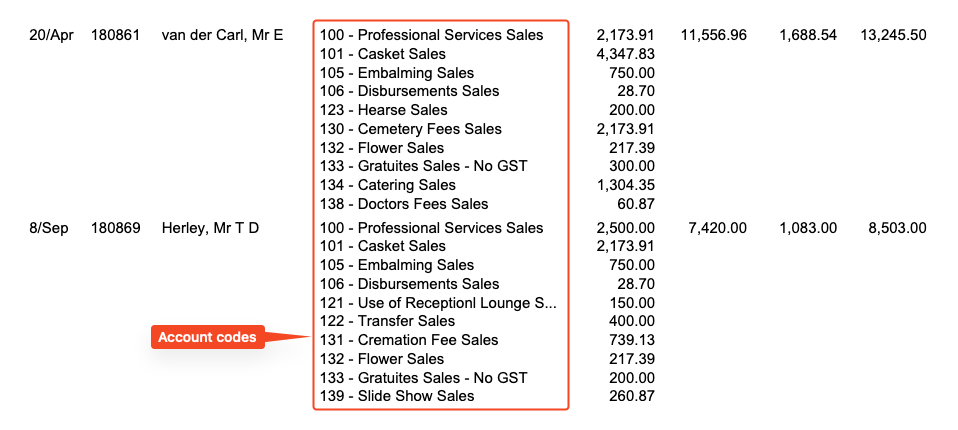
You can see that van der Carl had a casket price of $4,347.83 (ex GST)
and Herley has a casekt price of $2,173.91 (ex GST)
The combined value of casket sales is $6,521.74 (ex GST)
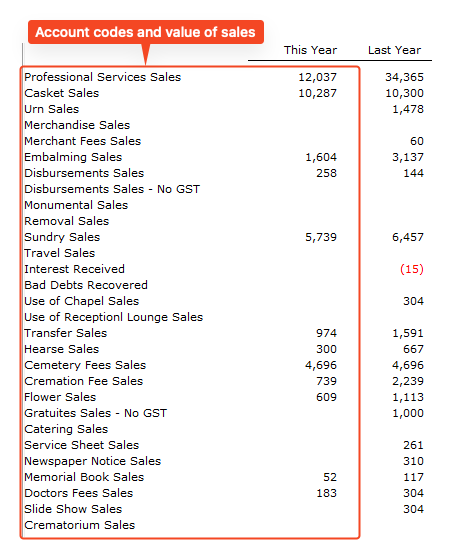
This split of sales means that over time the sales can be measured by these codes.
This is the combined values of all the individual invoices (fake data).
Sales Codes are set on the invoice
In the various invoice sections of FreeDAM sales codes are set.
Professional Services
This defaults to one sales code set in the company settings but there is a button at the bottom of this section that will enable you to change it to another one if required.
Additional Services
These are set up for you in the preferences, so you should not have to worry about setting a sales code when you select an additional service from the pink list.
However – if you add a custom additional service – you will need to select a sales code.
Casket / Coffin
There is no sales code for this section as it is solely reserved for the casket / coffin.
FreeDAM know the sales code for the casket due to company settings.
Urn
There is no sales code for this section as it is solely reserved for the urn
FreeDAM know the sales code for the urn due to company settings.
Merchandise
There is no sales code for this section as it is solely reserved for the merchandise items. Note that all the items that are added to the invoice in this section will be coded to ‘Merchandise Sales’.
FreeDAM know the sales code for merchandise due to company settings.
Disbursements
These are set up for you in the preferences, so you should not have to worry about setting a sales code when you select a disbursement from the pink list.
However – if you add a custom disbursement – you will need to select a sales code.
NOTE
Some disbursements may not contain GST
(some celebrants, most organists and pipers etc)
These need to be coded to a No GST sales account for the GST Return to be correct.
Mileage
There is no sales code for this section as it is solely reserved for the mileage sales
FreeDAM know the sales code for this due to company settings.
That wasn’t hard!
No, this is not difficult.
You can see most of the work has been done for you
however,
When adding custom line items to the invoice for the above sections,
you will need to be aware that the sales code for that item matters and why.