
Help to Display to the Family
The help for the family have been set for the case from the portal settings but can now be edited for just this case if required.
You should always look at these before sending the link to the family.
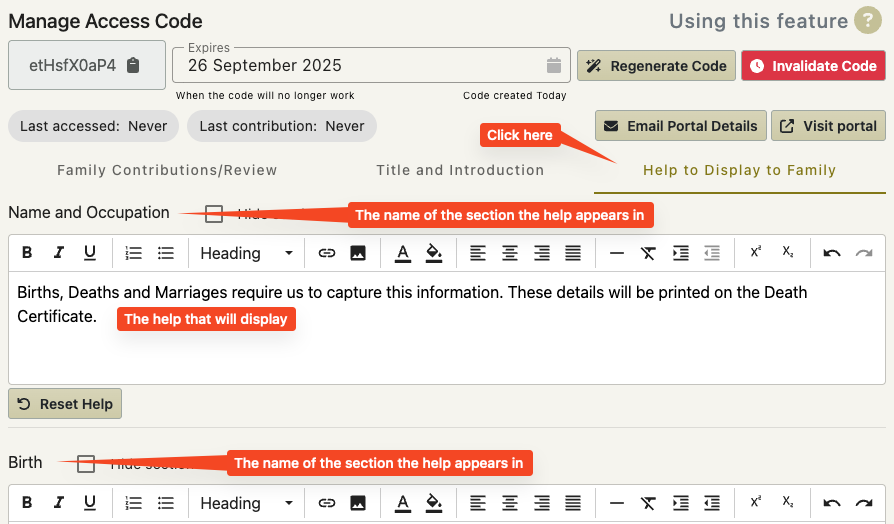
- Click on the Help to Display to Family tab
- Check that the help for each section displays correctly and that any codewords have been translated correctly.
- Make any edits you need to.
(may be necessary for a particular family – or you may wish to add a sentence or two)
You can reload the defaults by clicking the reset buttons next to each field.
Hiding Sections
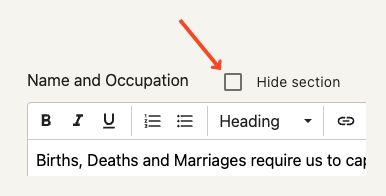
It is here that you are also able to hide a particular section for this particular family.
Tick the ‘Hide Section’ checkbox
This will hide the entire section including the help.
Why would I want to do this?
The family that you are working with might have a unique situation with the relationships of the deceased that you would much rather discuss with them.
In this case – just tick ‘Hide Section’ next to the Relationships help.
Note
Although you can change the title, information and help for each case, you cannot change the terms and conditions for each case. These will be what they are set as in the portal settings for the office the case belongs to.