
FAQs & Tips
I have set up a board but there are no cases/cards on it.
No there will not be until a new case is entered into FreeDAM that meets the criterial for the board as far as case type (funeral, prepaid etc etc).
You can make cases appear on the board though.
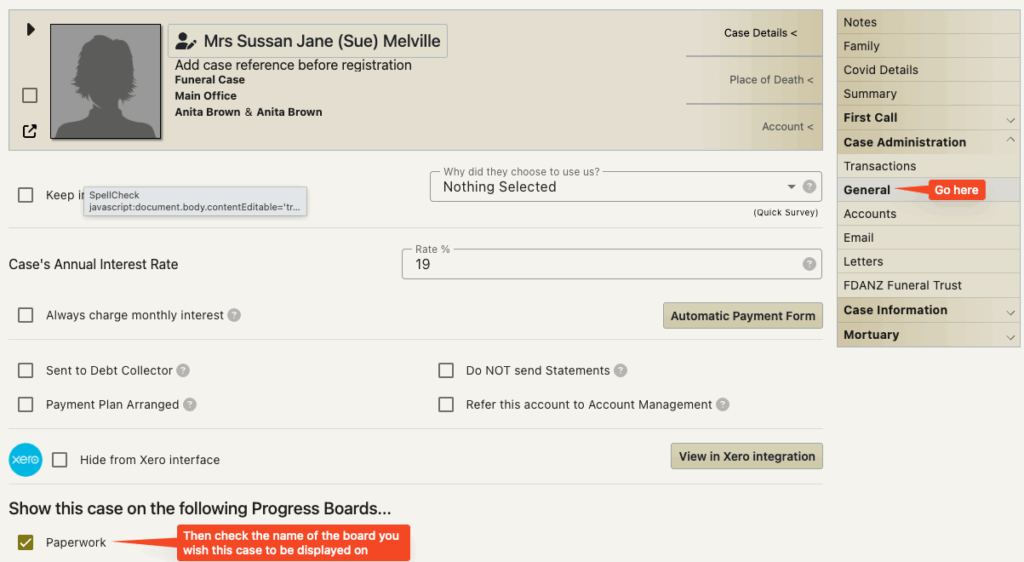
Go to the Case Administration – General screen for the case you wish to be on the board.
Now that you have set up a/some boards you will find that there is a area at the bottom of the screen for ticking which board this case should display on.
I have accidentally deleted a card from a progress board
How do I get it back?
Go to the Case Administration – General screen for the case you wish to be on the board. At the bottom of the screen check the board you wish the case to appear on.
See also above.
I have an unusual case that should not be on a board
How do I remove it from the board?
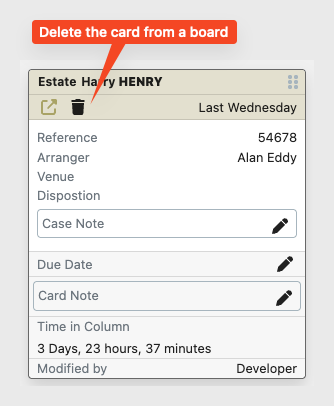
You can delete any card that is on a board by clicking the little trash icon under the name of the deceased.
This will remove the card from the board – but will not remove any of the data from FreeDAM.
Why is there a red boarder round some of my cards?
This indicates that this is a first call.
i.e/ this case does not have a case reference number.
As soon as a case reference number is given to the case the red boarder will be gone.