
The Casket / Coffin
This holds true for an ‘Invoice’ or ‘Estimate’ and these terms in the text are interchangeable .
This area of the invoice allows you to adjust the details of the casket/coffin.
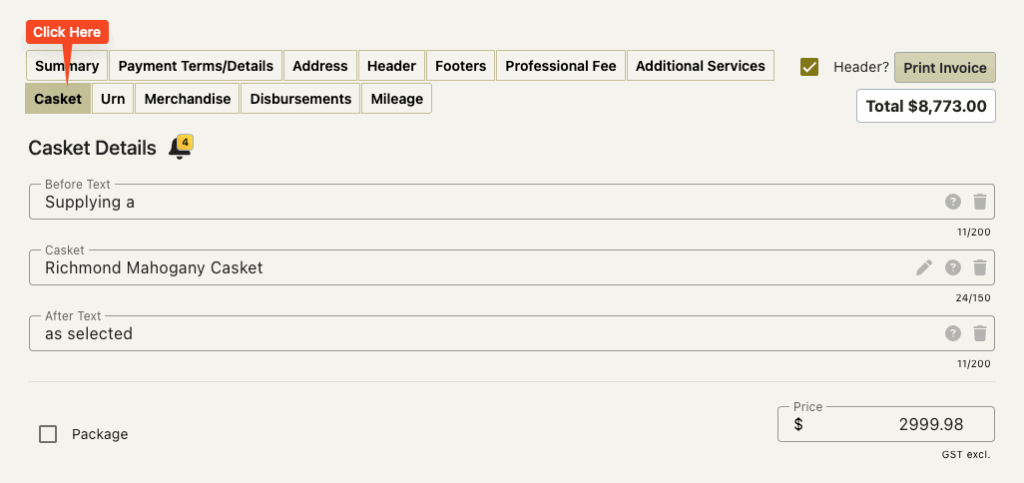
This screen also has invoice reminders on it
The Before Text and After Text
This allows you to add text before and after the name of the casket/coffin on the invoice.
Rather than casket line on the invoice looking like this
Richmond Mahogany Casket $2999.98
the casket line on the invoice would look like this
Supplying a Richmond Mahogany Casket as selected $2999.98
There are FreeDAM default settings for these.
You may find that these are already set for you
or it may be that your company prefers these to be empty.
You can freely type in these fields or chose from a list of predetermined options that are provided from your preferences.
The Casket / Coffin Name
FreeDAM has two names for caskets/coffins
An Internal Name
This is the name used on your main details screen.
An Invoice Name
This the name that is used on the invoice.
The reason we do this is that this allows you to use in FreeDAM casket names that the whole team are used to referring to, like
‘Liner’ or ‘Rimu 5’9″ flat lid’
but have these appear on the invoice in a much more family friendly way like
‘Cremation Casket’ or ‘Plain Rimu Casket’
The casket name on this screen will be the invoice name for the casket and may differ from the name of the casket elsewhere in FreeDAM.
You are able to change the casket/coffin on this screen.
Click the trash can at the end of the casket field and then the little pencil icon to select from a list of your caskets.
(or you can just type into the field)
Sales Coding
There is no way of changing the sales code for the casket/coffin.
The values will be sent to the code set in the company settings.