← How Access Works
Turning on a New Feature
Often you will want to ‘Turn On’ a new feature in FreeDAM.
This is done through the roles system.
Adding the ‘New Feature’ settings to a role
Often new features have a setting or set up screen.
This should really only be made available to people who are trusted or responsible for the new feature.
You can do this by doing one of two things…
- Add this settings screen to a current role that a trusted staff member has.
i.e. an administrators role
Any staff member who has this role will get this screen - Create a new Role named specifically for the ‘New Feature Settings’
Give this role to the person/people who are to be responsible for these settings.
Adding the New Feature to the team members who will be using it.
This can be done by doing one of the following…
- Add the screen/area of this new feature to a current role.
i.e the funeral director’s role
All staff members with the funeral director role will now have this new feature - Create a new Role named specifically for the ‘New Feature’
Give this role to the person/people who are to use the new feature.
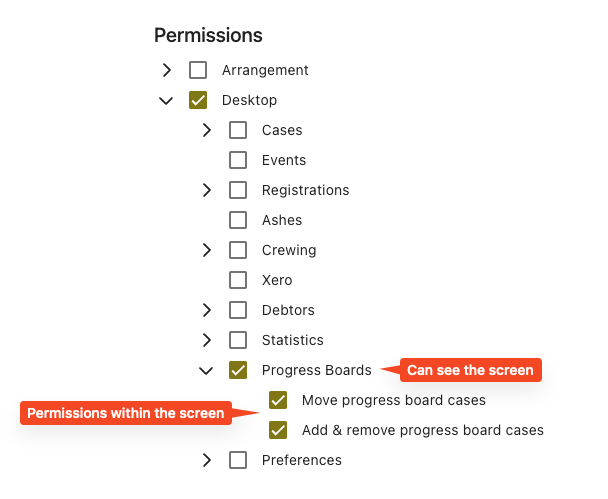
Ensure the permissions within the screen are set correctly
Some new features just have a screen to enable for the team but other new features may have permissions within the screen that you are able to set.
For example…