
Hiding Sections from the Family
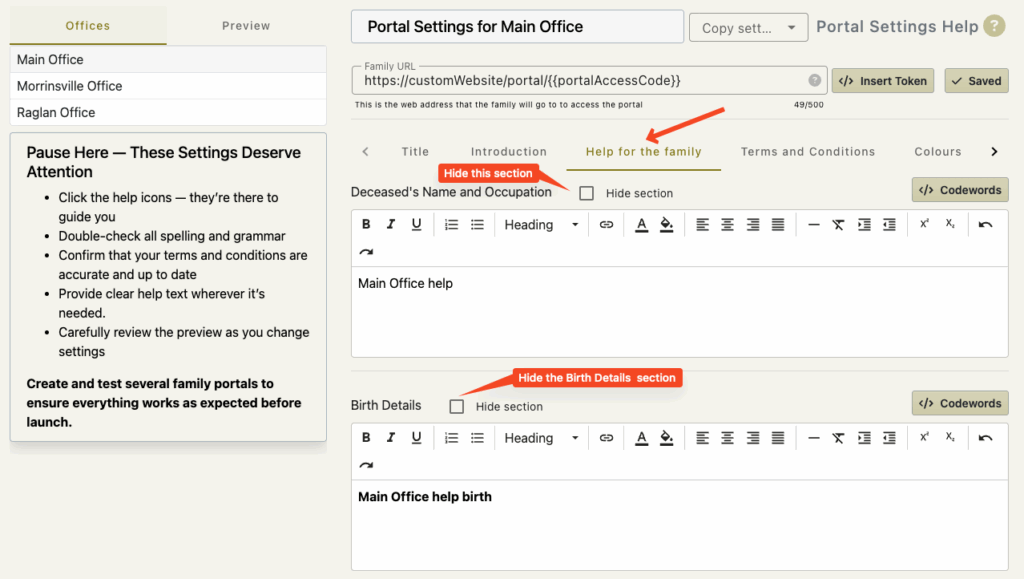
Each section of data that is able to be filled in by the family is able to be hidden.
Note:
FreeDAM Automatically hide the relationships and Children sections if the deceased is under the age of 12 years.
You might want to do this if you find families consistently struggling to fill in data of a particular section or if you would rather discuss your terms and conditions in person.
These sections are…
- Name address and Occupation
- Date and place of birth
- Mother’s Details
- Father’s Details
- Relationships
- Children
- Siblings (Victoria only- and auto hides if the deceased is over 18 years old)
- Family Members
- Next of Kin
- Funeral Account
- Cremation questions (This automatically hides if the case is not for cremation)
- Terms and Conditions
To hide any of these sections by default check the ‘Hide section’ checkbox.
The checkboxes are located under the ‘Help for family’ tab and the ‘Terms and Conditions tab.
IMPORTANT
Changing these settings are the default.
When a portal is created for the family, funeral directors will be able to turn on the hidden sections if they want to.
EXCEPTION!
The exception for this is the terms and conditions.
If the terms and conditions are set to be hidden in the office/company settings then individual funeral directors will NOT be able to turn these on for a particular case.