
Introduction
When a portal is created, the introduction is set here are the defaults for the case.
When a portal is created for a case the introduction is able to be changed on the case if required.
The Introduction appears after the name of the deceased and before the various areas that the family can enter the deceased’s information.
The Introduction
The introduction is the space after the deceased’s name but before the data entry.
The introduction in the preview will update live as you enter the text in the introduction box.
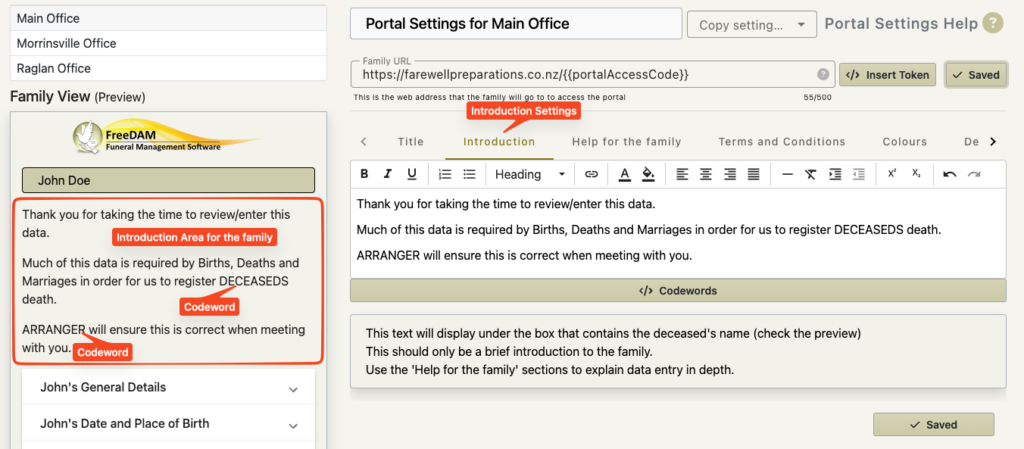
You may wish to have a few sentences here as an introduction for the family. This can explain the reasons for the data capture or anything else you feel is appropriate.
The use of code words in the introduction
You are able to use code words in the introduction.
These code words will be translated to the real data at the time of the portal creation for the family.
There are a limited number of code words you are able to use.
This is because there is a very limited amount of information we know about the case at this time.
- Deceaseds name and variations
- Deceased’s gender and variations
- Deceased’s title
- Date of death and variations
- Office email
- Company email
- Current user’s email
- The type of disposition (burial or cremation)
But this is enough to add a nice personalised touch.
For example.
This text in the introduction…
Thank you for allow us to assist you with the arrangements for DECEASEDS farewell.
Would be translated to…
Thank you for allow us to assist you with the arrangements for John’s farewell.