
Adding Code words
You are able to use code words in the introduction, help, terms and conditions and the default email within the portal settings.
These code words will be translated to the real data at the time of the portal creation for the family.
There are a limited number of code words you are able to use.
This is because there is a very limited amount of information we know about the case at this time.
- Deceased’s name and variations
- Deceased’s gender and variations
- Deceased’s title
- Date of death and variations
- Office email
- Company email
- Type of disposition (burial or cremation)
- Arranger’s name
- Interviewee’s name
- Interview Address
- Interview date
- Interview time
But this is enough to add a nice personalised touch.
For example.
This text in the introduction…
Thank you for allow us to assist you with the arrangements for DECEASEDS farewell.
Would be translated to…
Thank you for allow us to assist you with the arrangements for John’s farewell.
How to add code words to a field
A field that is a able to include codewords will have a button next to it to allow the easy insertion of a codeword/s
When this is clicked a popup window will display like this.
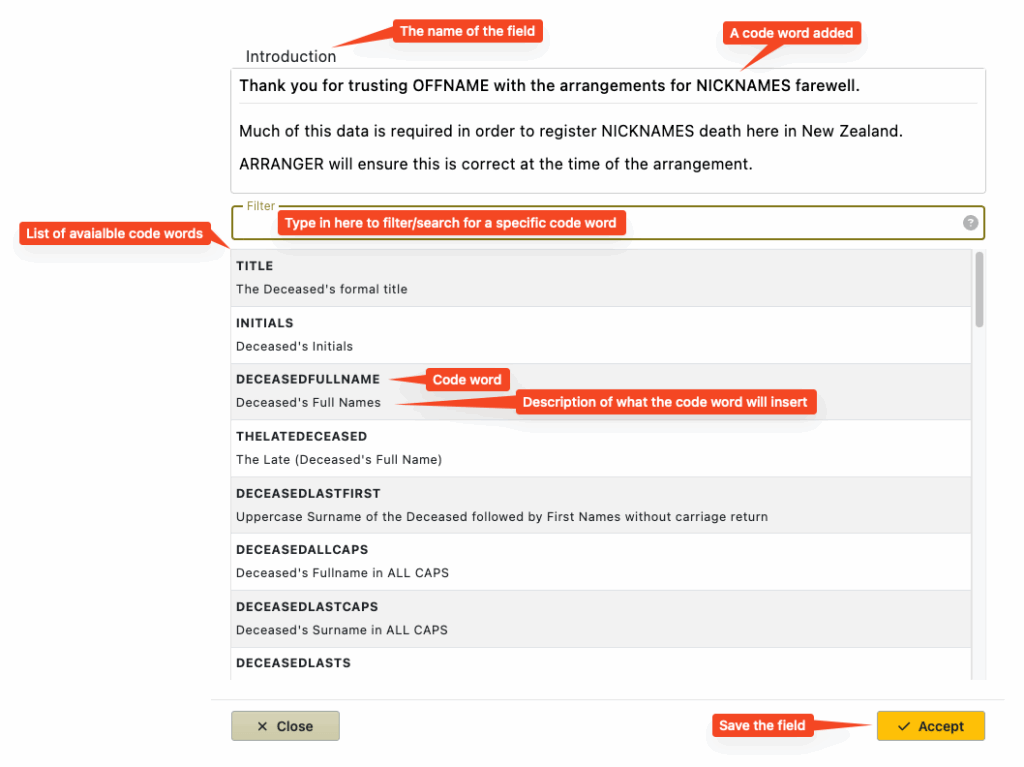
The field that you are editing is displayed at the top of the box followed by a search field for filtering the possible codewords, and a list of codewords.
Clicking on a codeword in the list will add it to the field you are editing.
If you would like formatting on the codeword then you are able to do this once you have clicked accept in the html editor field.