
Progress Boards – An Overview
Progress Boards are a way to manage your workflow.
A busy funeral home will have many clients in various stages of completion.
Progress boards are a way to visually see at what stage each client is.
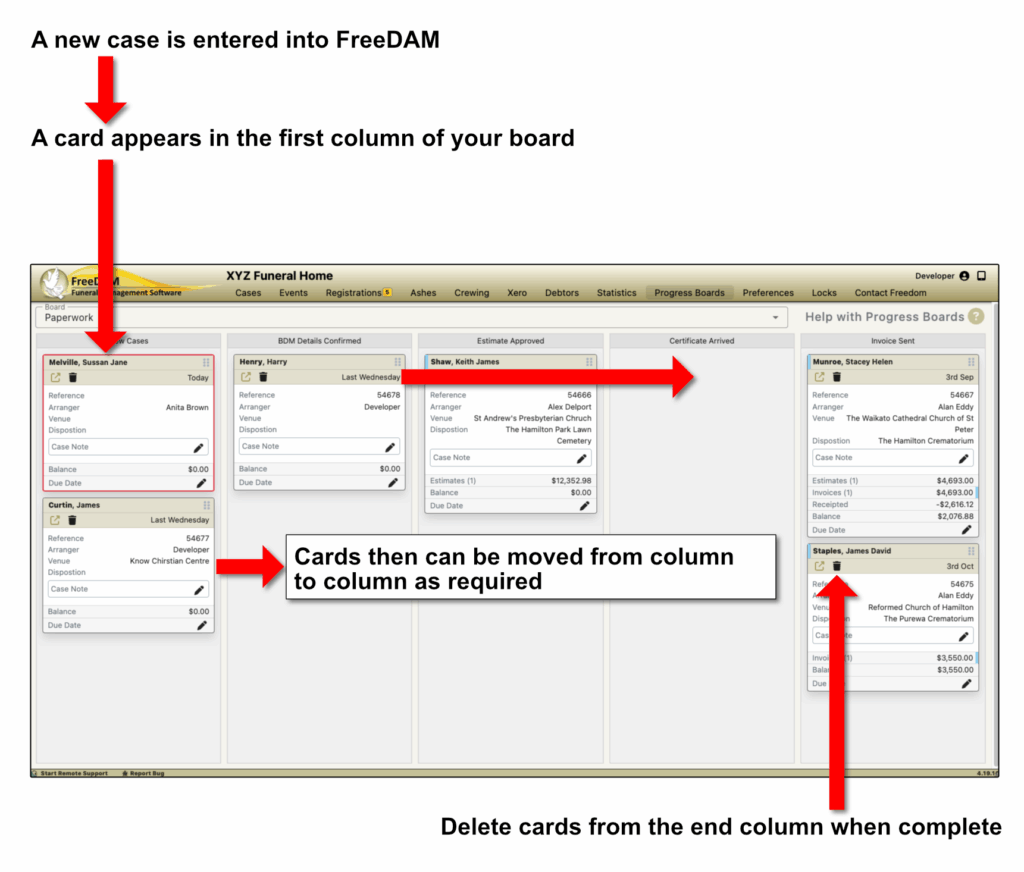
The columns
The columns are the various stages that the case can belong to.
They simply have a name i.e. ‘Photos Received’.
You can have as many columns as you require in a progress board.
The Cards
The card for each case will have the same details on it.
The appearance of these cards are able to be adjusted in the Progress Board Settings screen.
There are several ‘indicators’ on the card
A red outline means this is a first call case (no reference number assigned to it)
Small blue mark next to date means that the contact, file or invoice has been sent to Xero
Multiple Progress Boards
You are able to have as many progress boards as required.
Here are some suggestions for the various progress boards you could use…
- Paperwork – for the various stages or your internal estimate and invoice generation and presentation.
- Service Sheets – for the stages of producing service sheets – from requesting the images to printing the service sheets
- Location – This could be used for indicating to the team where each deceased is.
- Monumental Work – A board like this would be able to tell you at a glance what you are currently working on and what you are waiting for.