← Setting up your board(s)
The Card Settings
A ‘Card’ for each case will appear on a progress board.
These cards will be the same for every case on a particular board.
(you set the card appearance per board).
The case cards have been designed to be able to display case information in a compact format but also allow for multiple cards to display across the columns.
There is a lot of possible critical information able to be displayed on a card.
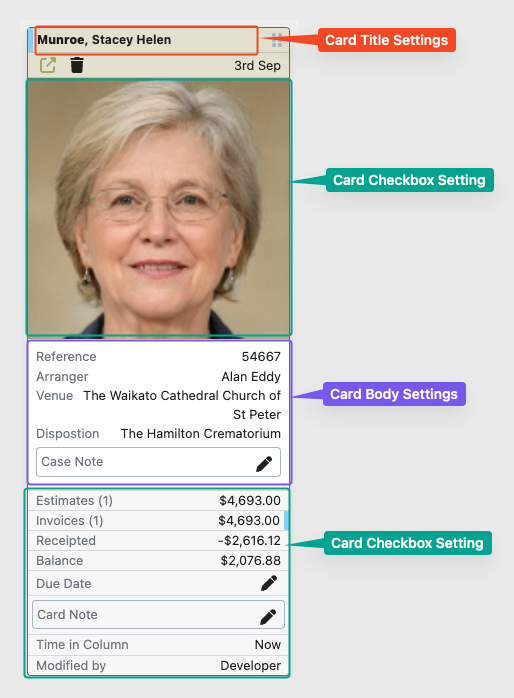
These are controlled by three types of settings.
- Card Title settings – How the case’s name will display at the top of the card
- Card Checkbox settings
These are a simple ‘Do I want to display this information on the card or not?’
You have no ability to customise these. - Card Body Settings
These you are able to customise in terms of the order the display in and the labels for the data.
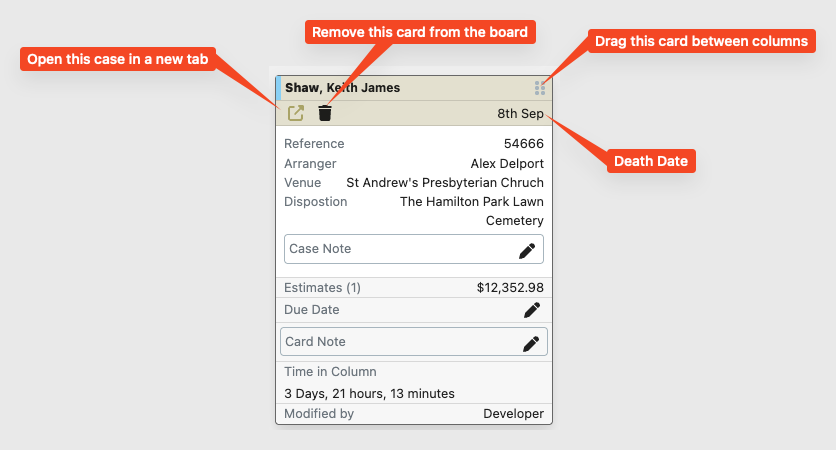
In addition there are some elements that will display on every card.
- Open the case in a new tab
This will open the case in a new tab within FreeDAM on the main details section. - The trash can
This will remove the card from the progress board (Not the case from FreeDAM).
You would use this once the case has gone through all the columns and the overall workflow for this case is complete. - The Death Date
This is just here for a handy reference. - The drag icon
This is where you click and drag the card to move it between columns.