
How Access Works
Roles
FreeDAM uses ‘roles’ to give you access to various parts of the software.
Only owners or senior staff are able to adjust and assign roles to staff members
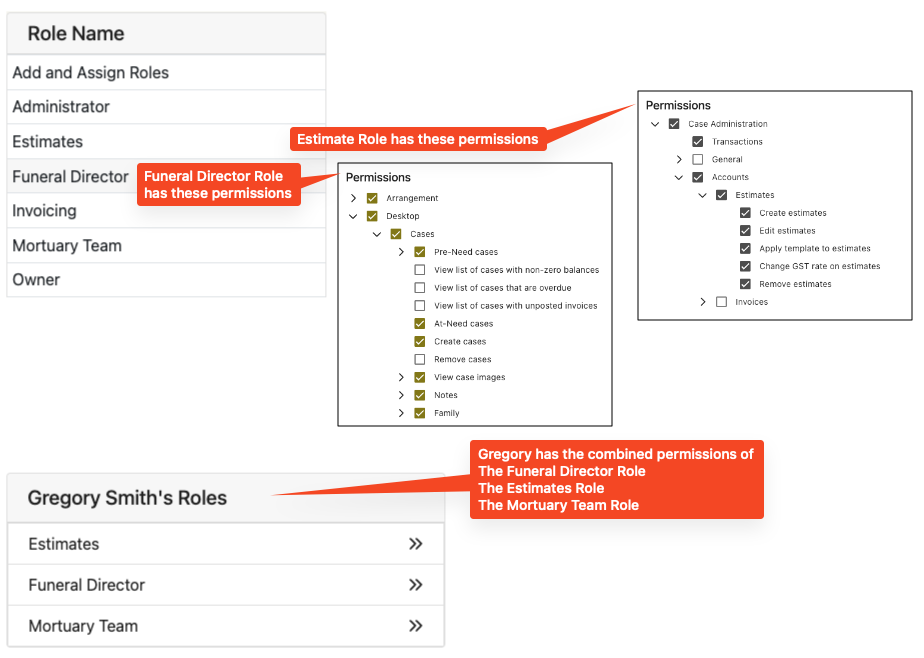
Roles work like this.
- Create a Funeral Director role that has all the screens and permissions that a funeral director is required to use.
- Give the Funeral Director role to each staff member who is a funeral director
- You can then create a role for embalmers that has the screens and permissions that an embalmer would use
- Give the embalmer role to each staff member that is an embalmer
If a Staff member is a funeral director and an embalmer then they get both roles.
The software will give them access to all the areas specified in both the funeral director role and the embalmer role.
This way if you wish to add a new screen to all the funeral directors (i.e. the funeral stream screen) then just adding it to the funeral directors role automatically gives all your funeral directors access.
If you would like to have a selected few team member register deaths for example,
Create a role that just has the registration screen – nothing else.
Then give that role to only the staff that are trusted to do register deaths.
See the other areas in this section for how to add, edit and assign roles.