Family Contributions
This is where the magic happens!!!
When the family login to the portal you will see in FreeDAM the Date and time the family last accessed the portal

When the family start entering data then you will see a new orange list appear on the left hand side of FreeDAM. This shows the name of any case the family have entered data. The count next to their name indicates how many fields they have entered data for. This count is in real-time!!!
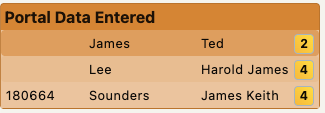
Clicking on the name in the list will take you to the Family Portal section in FreeDAM where you can see the data that the family have added.
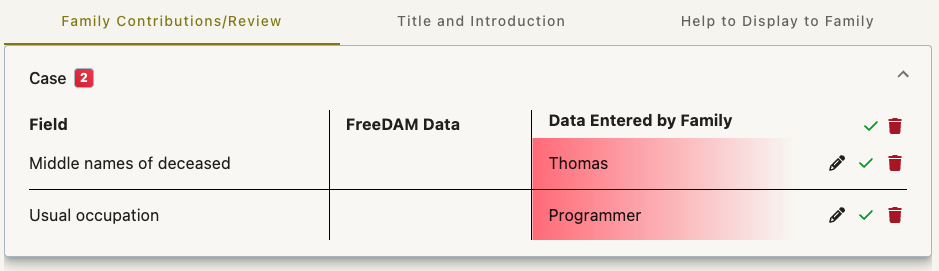
The Family contributions/Review tab will show you the data that has been entered by the family grouped in the sections in the Family view.
This is displayed in a grid format and has…
- The Section the data belongs to.
- The field description – so you know what data this is
- The current FreeDAM data
- The data that has been entered by the family
- An edit pencil
- An accept tick
- A reject trash can