
Correcting Data
Occasionally the data entered by the family will not be correct or need some correction before accepting it straight into FreeDAM.
This will usually be for capitalisation or misspelling of places.
FreeDAM allows you to correct these small errors before accepting the data.
You can see in the following image that the family have not capitalised ‘hamilton’
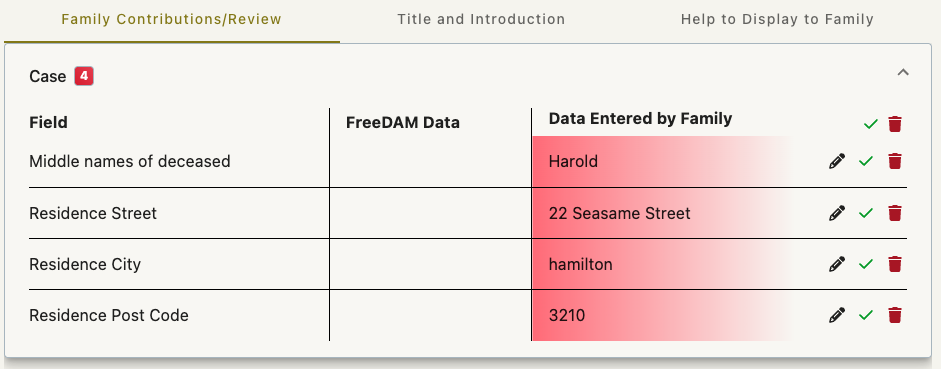
To correct this click the little pencil icon in the residence city row.
A pop up box will appear that will allow you to correct the data.
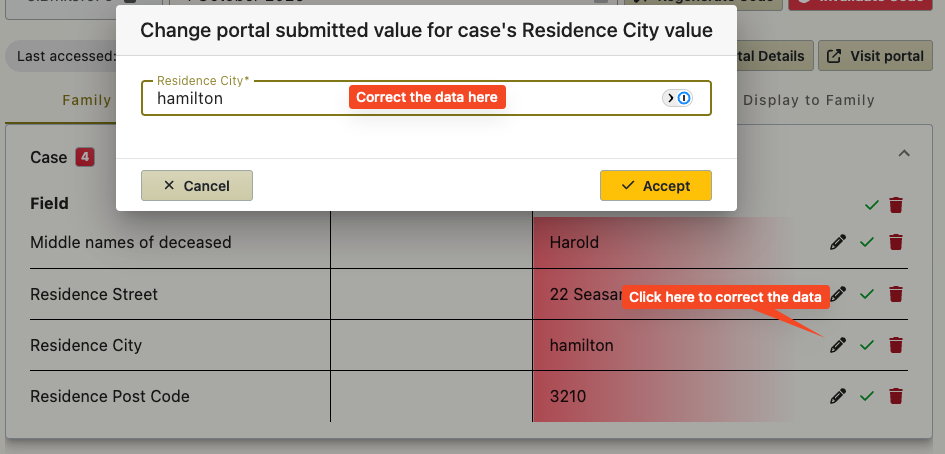
Corrected data will be seen by the family live!
If the family are actively using the portal when you correct any data, then the family will see these corrections immediately.
But they may have moved on to another section to enter additional data and may not be looking at the data just corrected).
What if I have accepted non-corrected data?
In this situation – just correct it in the normal area/s of FreeDAM as if you had entered the data yourself. Remember ‘accepted’ data turns into real FreeDAM data.