
The Card Checkbox Settings
These settings are either off or on for the card and all cards on the board take on these settings.
It may be that you only require a selected few of these for the workflow you are creating.
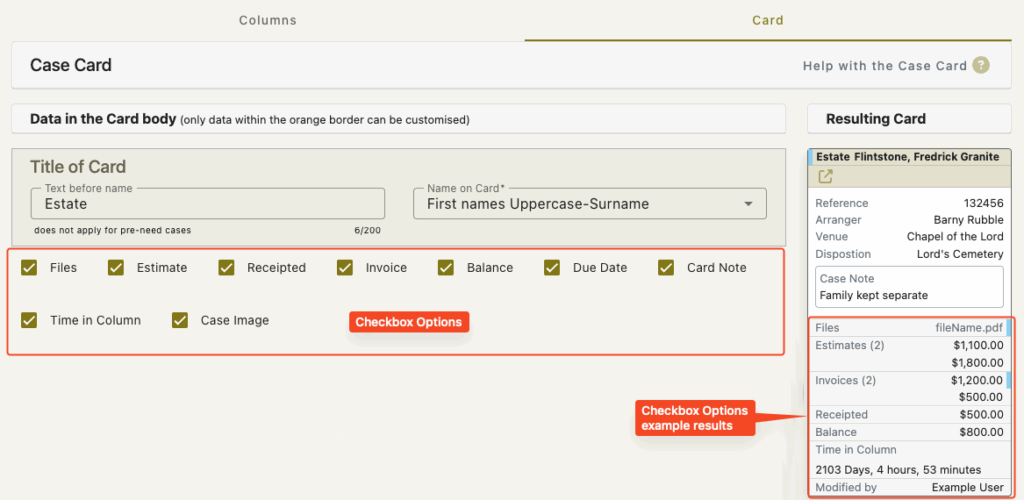
Files
This will display a list of files saved against the case
A blue Xero indicator will display to the right of the file name if it has been uploaded to Xero
Estimate
This will display any value of any estimate/s that are saved against the case.
Note – Estimates cannot be uploaded to Xero so there is no blue indicator to the right of these.
Receipted
This is the total value of receipted monies that have been recorded in FreeDAM
This is the FreeDAM balance NOT Xero’s
Invoice
This will display any value of any invoice/s that are saved against the case.
A blue Xero indicator will display to the right of the file name if it has been uploaded to Xero
Balance
This is the FreeDAM balance
Due Date
This is a date field for the card and it is to allow you to enter a due date for the case.
The Due date only affects the card and does not change anything in the case.
This due date could be related to the column name.
e.g. not due date gets filled in on the card until it get moved to a ‘deposit requested’ column. Now a user of the board can put in when the deposit is due.
Card Note
This is to allow notations on the card for the case relating to the workflow.
The card note DOES NOT appear in the case – just on the progress board/s
Time in Column
This is a note of how long a card has been in a column.
It displays in Days, Hours and Minutes
Each time you move a card to a new column this time gets reset.
The Case image
This will display the primary image that is saved against the case
If there is no image then nothing will display
These settings will display the data live
This means that if a user is viewing the board and a new file is saved against the case then the card will reflect this immediately without a screen refresh – which is very nice.