
Adding Help for the Family
You can add ‘Help’ text that will appear at the top of each section visible to the family. This is the ‘template’ help for each case. You have the flexibility to customize it per case.
When adding help – remember to check the The Preview
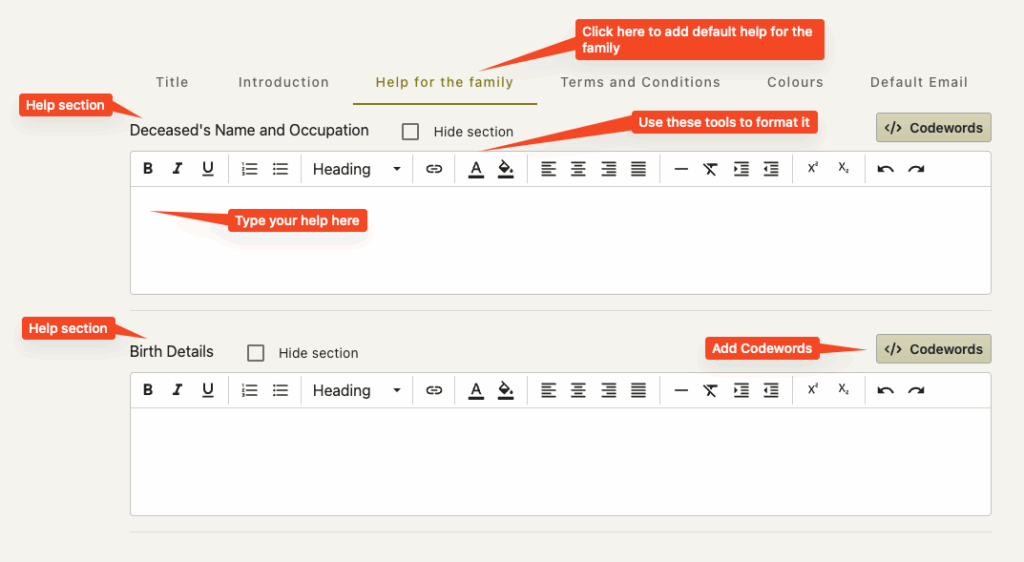
To add help for the various sections…
- Click on the ‘Help for family’ tab
- find the section that you wish to add help for
- Create your help in the field
- Format your help using the html tools at the top of the field
- Check the help in the preview
- Add in code words if required by clicking on the codewords button above the help field
- Click Save
Tips and Advice
Not all sections will need help – some are pretty easy to understand. Less is sometimes more
Try to personalise the help – use the deceased’s name where possible
Try not to have too much bold type or coloured type in the help unless it is really necessary.
We would not recommend to have links in the help.
It is never a good idea to take the user – in this case the family – away from the portal.
Try to use family centric terms – rather than funeral director terms.
(Births, Deaths and Marriages rather than BDM)
Some of the data could be considered intrusive by the family – after all – this might be the first funeral they have had to arrange for some time. It may be that the help for a particular section contains why we need to ask for this information.
You can use a separator in the help (a horizontal line) for clarity.
Remember, remember, remember that this is the family seeing this for the first time. Take more than a moment to really consider what you write from their point of view. What will they think if they read this? Is this going to be clear to them?
Before sending a link to the family for the first few times – visit the portal yourself to ensure things are looking good.
Adding code words
Help can contain code words that will be translated into real data at the time of the portal creation for a case. See Adding Code Words